Matlab is one of the worst languages ever despite of having many invaluable features [1][2].
Previously I have had used Matlab about 5 years ago and recently needed it again. MathWorks has tried to incorporate a Jupyter notebook like feature called live scripts into Matlab. While Jupyter notebook being really useful for interactive coding, I had a hard time adjusting to the Matlab live scripts. So here’s how I setup Matlab with Jupyter notebook (After having Matlab and Jupyter notebook installed obviously)
Setting up the Matlab kernel
- Go to you Matlab installation directory/extern/engines/python (This is
/usr/local/MATLAB/R2020b/extern/engines/pythonfor me)cd /usr/local/MATLAB/R2020b/extern/engines/python - Run the
setup.py(You might needsudodepending on the python installation you have)python3 setup.py install - Install the matlab kernel (Might need
sudo)python3 -m pip install matlab-kernelCollecting matlab-kernel
These are the basic steps but here’s a more detailed guide from MathWorks if needed. Now you can start jupyter notebook as usual and you’ll see a Matlab option in open new notebook drop down
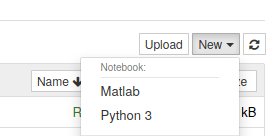
Matlab notebooks
You can straight away start writing Matlab code in the Matlab notebook just like you have used it with python. Here’s a few tips I figured out while using the notebook
Plotting
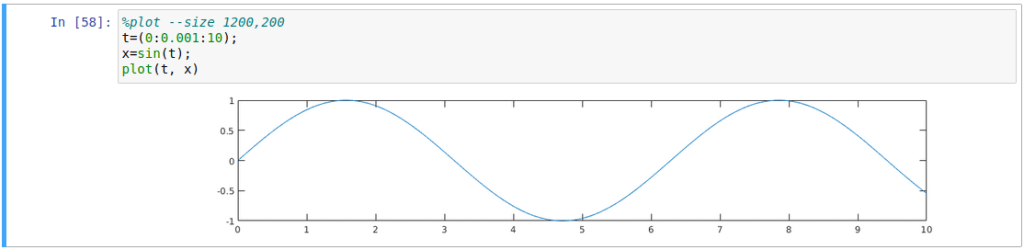
Inline plots are displayed by default just like in python matplotlib plotting. However, if you need to change the plot properties, you’ll have to use some Jupyter magic commands like this
- Popup plot
%plot native - Switch back to inline plot
%plot inline - Plot size
%plot --size 600,200(width, height)
Matlab toolboxes and simulink
They work just like how they work in the Matlab software. i.e. Type simulink and shift+enter -> you’ll get the simulink GUI.
Python code in Matlab notebooks
You can have python (or any other language which you have support for Jupyter notebook) code cells inside the Matlab notebook. Just use the magic command %%python at the start of the cell

Matlab cells in Python notebooks
This is not as straightforward as having python cells in a Matlab notebook. Here’s how you do it [source]
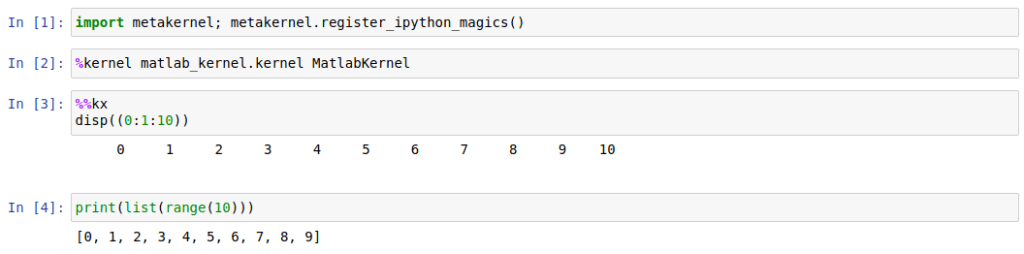
- First you have to register IPython magics
import metakernel; metakernel.register_ipython_magics() - Then start the Matlab kernel
%kernel matlab_kernel.kernel MatlabKernel
Now you can have Matlab code in cells starting with the magic %%kx
Further reading
This course has several tutorials with examples on Matlab in Jupyter: https://am111.readthedocs.io/en/latest/index.html.
This is the Matlab kernel git: https://github.com/Calysto/matlab_kernel
Please feel free to comment any other useful features I have missed. Cheers!
 Notes to my future self